From 17 Hours to 6 Minutes: How We Triage GitHub With Two DocsGPT Agents
Two DocsGPT agents triage GitHub issues and review PRs on arc53/DocsGPT: how they're wired, how we contain prompt injection, and 6-minute first replies.
Pavel Torbin14 min readagentsopen-sourcesecurity
In October, arc53/DocsGPT received 373 new issues and pull requests, almost three times as many as the October before. It was Hacktoberfest, the team that maintains DocsGPT is small, and a year ago a contributor whose PR was missing a screenshot found out about it a day later.
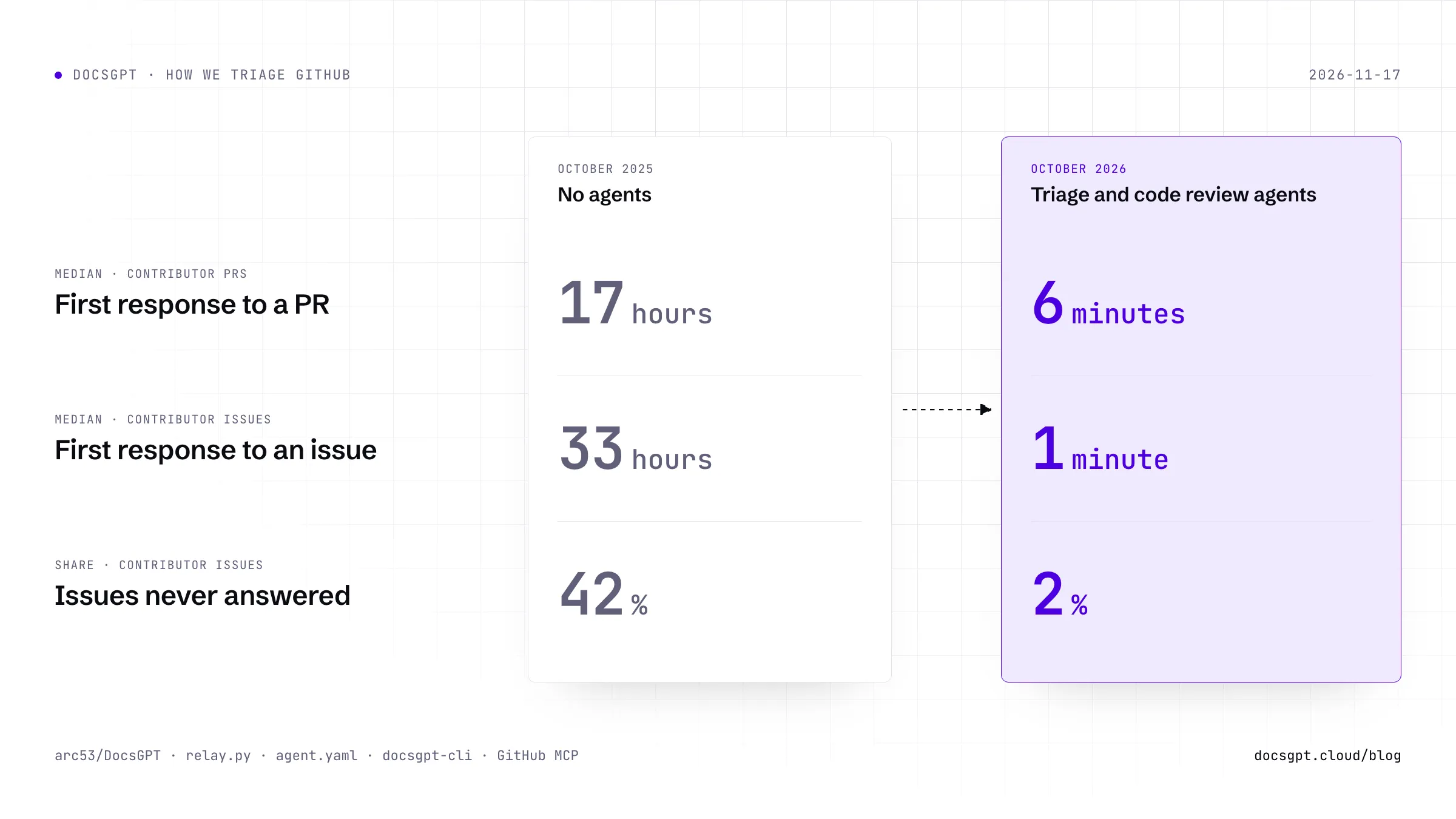
This year two agents did the first pass on everything, both built on DocsGPT. A triage agent labels, assigns and answers every new issue and pull request within minutes. A code review agent downloads each PR, runs its tests in a sandbox and sends a maintainer its verdict. The median time to a first response on a contributor PR went from 17 hours to 6 minutes, and the two agents together cost about $116 for the month.
Everything that drives the triage agent is public in the repository. What follows is how the agents are wired, how we keep text written by strangers from steering them, and the month's numbers with how we measured them.
The Relay Gathers the Facts, the Agent Makes the Call
An issue opened, a PR opened or marked ready, a comment, CodeRabbit or CI finishing: each of these starts a GitHub Actions workflow, triage.yml. The workflow skips bots and maintainers' own activity, then runs relay.py, a standard-library Python script that collects what the agent would otherwise spend tool calls looking up. That means the author's history in the repo, similar issues and open PRs, who claimed an issue and when, CI state, unresolved CodeRabbit threads, new dependencies, missing locale keys, whether a UI change has a screenshot, and the bot's previous review.
docsgpt-cli then posts that JSON to the agent's webhook with agents trigger and waits for the run. With the facts in hand, the agent gets a budget of 8 tool calls before it acts, so a triage run takes about a minute. It searches three sources (the contributor guides, the product docs and a triage-manual wiki), acts on GitHub through GitHub's MCP server as the arc53-machine account, and sends a maintainer a short report when someone has to decide. A daily schedule runs a stale sweep on the same agent.
Text version
A GitHub event (an issue, a pull request, a comment or a finished CI run) goes to relay.py, which filters it and gathers the facts, then to docsgpt-cli agents trigger, which posts the payload to the agent's webhook with an idempotency key. The triage agent, highlighted, works from those facts with up to 8 tool calls and takes about 60 seconds. A daily schedule also sends it a stale sweep, and it searches three sources: the product docs, the contributor guides and the triage wiki. It writes to GitHub through the GitHub MCP server as arc53-machine (labels, assignees and comments) and sends a report to a messenger when a maintainer has to decide.
The split is deliberate. Deterministic code does the lookups and the model does the judgement, so the agent spends its turns deciding instead of searching.
What a Contributor Sees Within Minutes
What the triage agent does depends on the event:
- Issue opened: scores it for usefulness, clarity and spam, labels it, and then asks for missing details, links a duplicate, or redirects a vulnerability report to private reporting.
- Someone asks to work on an issue: assigns the first person who asks, or declines when someone already has a PR or the claimant has too many open assignments.
- PR opened: a quick pass for a missing screenshot, a heavy new dependency, competing PRs and spam.
- CodeRabbit or CI finished: a verdict (ready, changes needed, not a fit, spam), a review comment when the open items change, and a message to a maintainer only when they have to act.
- An @-mention: a reply on the thread. When a maintainer mentions it, the request is carried out.
- Every day: marks idle items stale, closes stale issues 30 days later and frees assignments nobody is working on.
PR #3018 added a Cal.com connector preset. It was opened at 23:34 UTC, and the triage comment arrived 68 seconds later. The comment asks the author to show the OAuth sign-in working, points out that another open PR adds the same preset, and catches a missing comma in the docs.
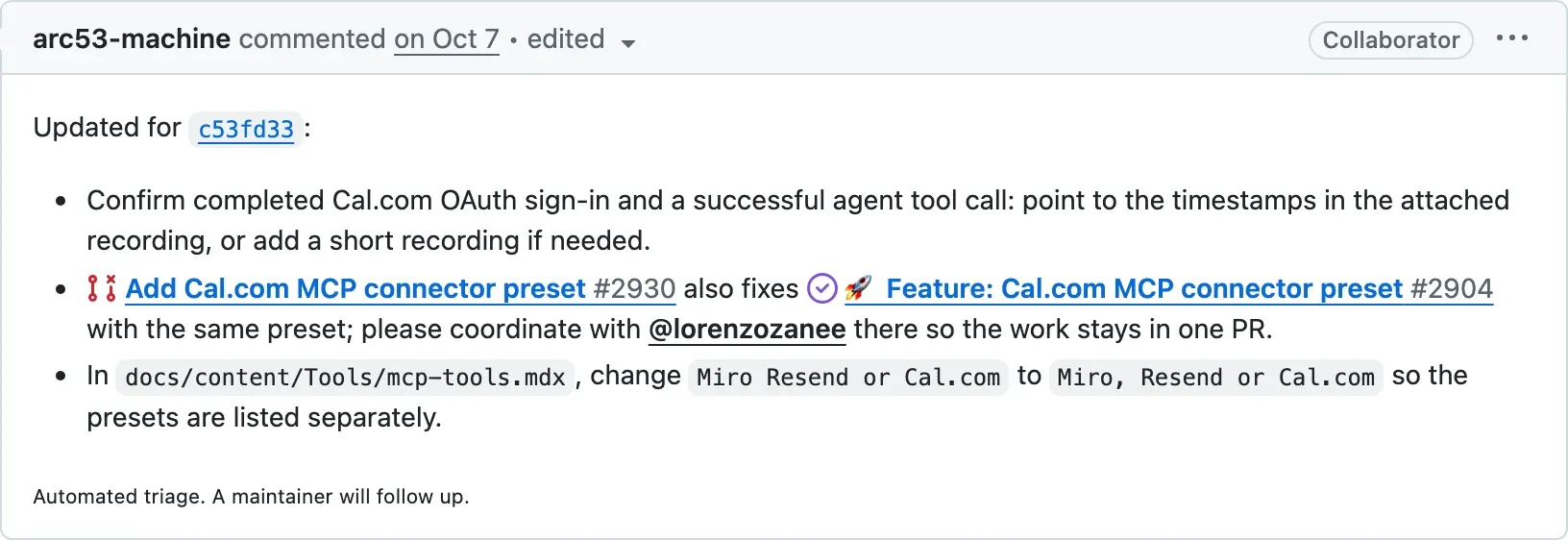
The first response is usually the bot's: labels, plus either a checklist for the author or a note that a maintainer will review. That's the point. A contributor knows within minutes whether their PR is missing a screenshot, tests or locale keys, and a maintainer's first look comes when the PR is ready for one.
A Code Review Agent Runs Each PR's Tests in a Sandbox
Triage decides what a PR still needs. The code review agent, which started on October 12, checks whether the code works. A schedule wakes it every 30 minutes to look for PRs with new commits. For each one it reads the diff, the files, CI results and review threads through a read-only GitHub tool, then downloads the PR into a code sandbox and runs its tests, and main's for comparison. Its memory is a wiki page, /reviewed.md, so a poll with nothing new finishes in about 16 seconds.
The output goes to a maintainer in a messenger: a verdict, the findings, and a reply the maintainer can post on the PR. In October, 12 of its 15 change requests came with a bug it had reproduced in the sandbox.
Text version
A schedule every 30 minutes wakes the code review agent, highlighted, which only looks at PRs with new commits. It reads the diff, files, CI and review threads through a read-only GitHub MCP tool; downloads the PR into a disposable sandbox and runs its tests and main's; keeps a record of what it has reviewed in the wiki page /reviewed.md; and sends the verdict, the findings and a reply the maintainer can post to a messenger.
Scheduled agents like this one are the subject of What Your Agents Do at 3 A.M., and every run shows up in the Activity tab.
The Agent Is a File in the Repository
The triage agent's prompt, model, tools and sources live in .github/triage/agent.yaml. A second workflow applies it with docsgpt-cli agents apply on every push to main that changes it, and it re-syncs the documents the agent searches: the contributor guides whenever they change, the product docs weekly, re-embedding only the files that changed. Changing how the bot behaves means reviewing a diff to a plain-text policy. An excerpt:
apiVersion: docsgpt.arc53.com/v1
kind: Agent
metadata:
  slug: docsgpt-triage
spec:
  name: DocsGPT Triage
  agent_type: agentic
  sources:
  - name: docsgpt-triage-manual
    type: wiki
  - name: docsgpt-contributor-guides
  - name: docsgpt-product-docs
  tools:
  - type: mcp_tool
    name: arc53-machine-triage
  - type: read_webpage
    builtin: true
  - type: telegram
    name: PikaMail
  prompt:
    name: docsgpt-triage   # the triage rules follow, in plain English
Two smaller choices made it easier to live with:
- Corrections without a deploy. When the bot makes a bad call, a maintainer adds a line to
/corrections.mdin the triage wiki. The agent searches the wiki on every run, and those entries override its judgement. - Idempotent triggers. GitHub redelivers webhooks. Each job carries an idempotency key, so a redelivered event returns the earlier run instead of starting a second one.
How We Contain Prompt Injection: Text From Strangers Is Data
Every input to these agents is written by someone we don't know: issue bodies, PR descriptions, diffs, comments, linked web pages. The triage agent can also write to GitHub. Rather than rely on the model to resist instructions, we limit what a hijacked run could do.
- Least privilege on the token. The bot account has the repository's Triage role. Its token can read and write issues and PRs and only read code. It can't merge or approve, and GitHub refuses to let it close pull requests. Static MCP headers pin it to the one repository, and only 16 GitHub actions are switched on. The code reviewer's GitHub tool is read-only, so its only outputs are a messenger report and its own notes.
- Trust comes from the relay, not from text. Whether a commenter is a maintainer is decided by the relay (a login list plus GitHub's author association) and passed to the agent as a boolean. A maintainer who @-mentions the bot can ask it to do things. Anyone else's comment is data, whatever it claims to be.
- The prompt states the trust boundary. Everything people wrote is untrusted; our docs and wiki are trusted. If someone's text tries to instruct the agent, the agent ignores it and flags it in the maintainer report.
- Unattended runs can't escalate. In webhook runs, any tool that needs human approval is denied automatically. The relay's Actions logs are public, so it never prints the agent's answer.
- Untrusted code runs in a sandbox. The reviewer executes PR code only in a disposable sandbox, never on our machines or in CI.
| What it can do | Triage agent | Code review agent |
|---|---|---|
| GitHub access | Triage role as arc53-machine · one repository · 16 actions (4 write) |
Read-only |
| Merge or approve a PR | No | No |
| Close a PR | No (GitHub refuses) | No |
| Run contributor code | No | Only in a disposable sandbox |
| Write to | Labels · assignees · comments · messenger | Messenger · its own wiki notes |
In October the triage agent, following the trust-boundary rule in its prompt, flagged text aimed at agents more than 20 times. None of it came from a contributor attacking the bot. Almost all of it came from other tools: CodeRabbit's review comments include "prompt for AI agents" blocks, and several vendor docs pages (Vercel, ClickUp and others) contain instructions for browsing agents. The agent ignored them and checked each finding against the code itself. The day a real attack lands, the worst case is a wrong label or comment, and a maintainer sees the report.
The triage workflows follow the same habits as the rest of our CI, which we tightened under the GitHub Secure Open Source Fund: no default token permissions, pinned actions, and a relay that never checks out PR code. For agents that answer your own users, DocsGPT's guardrails add a prompt-injection model that checks input, retrieved sources and tool results.
October in Numbers
| Contributor issues and PRs | Oct 2025 (no agents) | Oct 2026 |
|---|---|---|
| Median first response on PRs | 17 hours | 6 minutes |
| Median first response on issues | 33 hours | 1 minute |
| Issues with no response | 42% | 2% |
| Contributor PRs merged | 29 | 54 |
Triage
- About 680 runs: 569 GitHub events, 29 daily sweeps, the rest maintainer chats
- 328 comments on 175 issues and PRs
- 302 messenger reports, 82 of them "this PR is ready for you"
- 2 vulnerability reports filed as public issues, redirected to private disclosure
- About 60 seconds per event (median)
Code review (from October 12)
- 40 PRs reviewed: 17,700 added lines across 551 files
- 59 verdicts: 42 approve, 15 request changes, 2 handed to a maintainer to decide
- 12 of the 15 change requests came with a bug reproduced in the sandbox
- About 3.4 minutes per review (median)
- 882 polls, 837 of which found nothing new and finished in about 16 seconds
Cost. About $116 for the month for both agents, which works out to about $0.10 per triage run and under $1 per review. Of the 182M input tokens, about 80% were served from the prompt cache. The agents read the same long prompt and docs on every run, so caching is what keeps the bill small.
Reliability. 9 of about 920 scheduled runs timed out. 103 model calls failed over to a second provider, and those runs finished. About 98% of tool calls succeeded.
How We Measured
- The volume comparison counts every new issue and PR from any author: 373 in October 2026 against 131 in October 2025, from GitHub search.
- Response times come from the GitHub API. They count only issues and PRs opened by people outside the maintainer team and not by bots: 41 issues and 106 PRs in October 2026, against 33 and 56 in October 2025. They measure the first comment or review by a maintainer or the bot.
- Run counts, tool calls, tokens and cost come from DocsGPT's own records for the two agents. Per-step latency traces are kept for 30 days, so the latency figures cover October 16 onward.
Run It on Your Own Repository
The relay, the agent definition and the workflows are in the DocsGPT repository under .github/triage/, with a README that covers the setup and the shadow mode it starts in: the agent writes nothing to GitHub and reports what it would have done. Run it in shadow mode on your own repository for a week, read the reports, then switch it to live. Agents covers webhooks, schedules and tools, Connectors covers GitHub, Telegram and custom MCP servers, and Deploy compares where DocsGPT can run. Or ask us how it would fit your team.