Web
Search and read the web
Two search providers and a page reader that returns Markdown.
Brave Search · DuckDuckGo Search · Read Webpage (URL → Markdown)
DocsGPT agents are private AI agents over company data. Each one combines a knowledge source, a system prompt and a set of tools, and comes in one of four types: Classic, Agentic, Research or Workflow. Agents are published with a share link, an API key or a schedule, and run inside your own deployment.
classic · agentic · research · workflow · mcp · cron · share link · api key
Last updated:
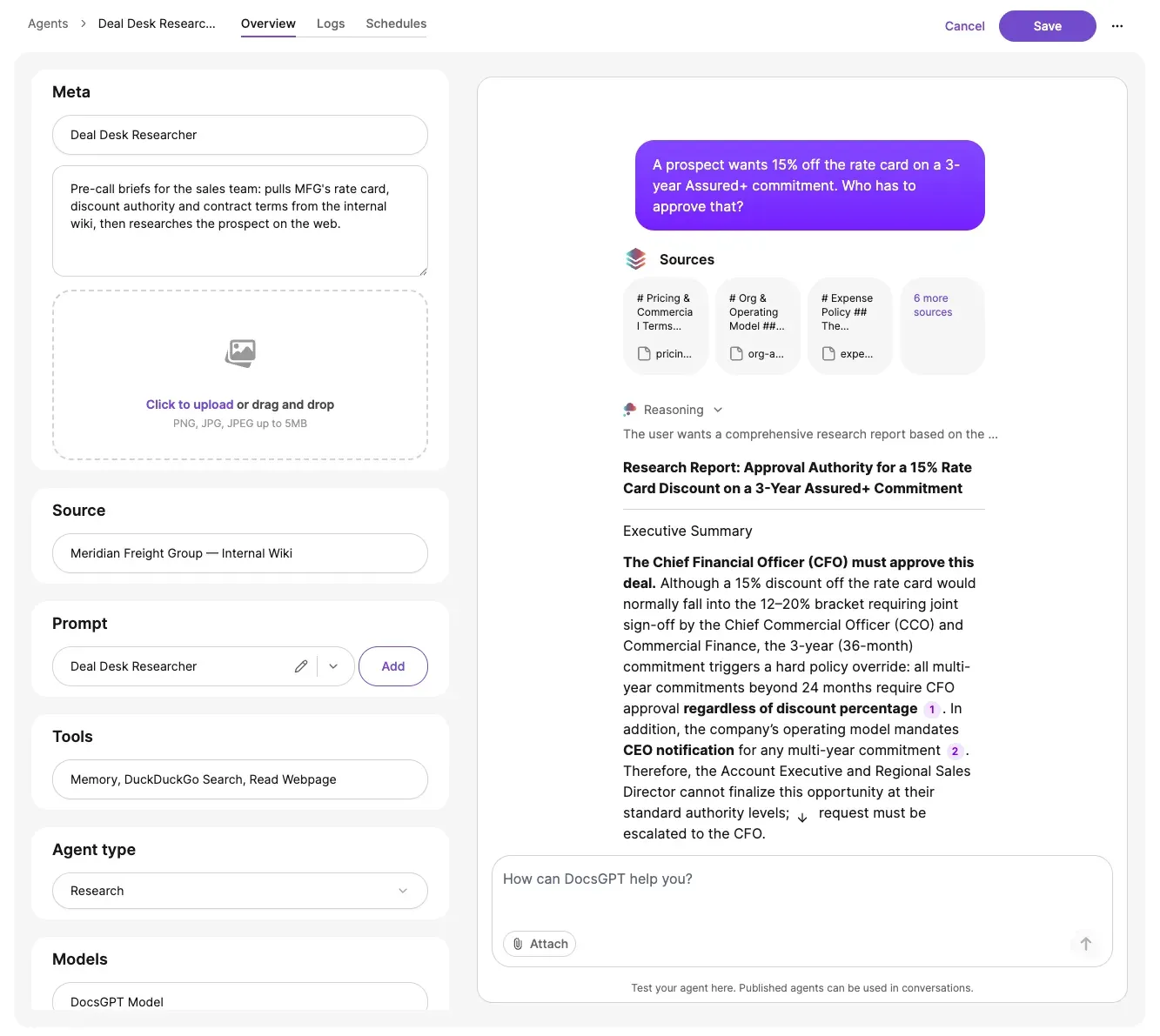
Every agent is one of four types. The type decides when retrieval happens and how many steps the model may take; knowledge, prompt and tools are set the same way for all four.
Whatever the type, any answer or tool call can be held for human approval before it goes out. See Guardrails and human-in-the-loop.
type · knowledge · system prompt · tools · publish
| What it does | Retrieval | Fits | |
|---|---|---|---|
| Classic | RAG Q&A with pre-fetched chunks, plus tool use | Chunks retrieved before the model runs | Assistants over a known knowledge base |
| Agentic | LLM decides when to retrieve (internal_search tool); multi-step tool calling | On demand, as a tool | Tasks that mix retrieval with actions |
| Research | Clarify → plan → research → synthesise with citations; budget controls (steps, timeouts, tokens) | Iterative, planned | Long questions across many sources |
| Workflow | Executes predefined node graphs with branching and shared state — Workflows → | Per node | Deterministic document processes |
Classic agents answer with pre-fetched chunks plus tool use. Agentic agents let the model decide when to retrieve (internal_search) and call tools over several steps. Research agents clarify, plan, research and synthesise with citations under step, timeout and token budgets. Workflow agents execute predefined node graphs with branching and shared state.
Fourteen built-in tools cover web search, databases, REST APIs, MCP servers, remote machines, messaging, memory and image generation. Anything else is a custom tool written with the Python SDK. Tool calls can be gated by human approval, and Remote Device commands additionally pass approval modes, a denylist and an audit log.
Web
Two search providers and a page reader that returns Markdown.
Brave Search · DuckDuckGo Search · Read Webpage (URL → Markdown)
Data and systems
Query PostgreSQL; call any REST endpoint with LLM-filled parameters, no code; connect remote MCP servers with none, Bearer, API-key, Basic or OAuth auth (v0.15).
PostgreSQL Database · API Tool · MCP Tool
Devices and messaging
Operate a paired machine through the docsgpt-cli daemon, with approval modes, a denylist and an audit log; send messages and push notifications.
Remote Device · Telegram · Ntfy push
Working memory
Persist facts across turns, keep scratch notes and track a task list inside a run.
Memory · Notepad · Todo List
Generation
Generate images from a prompt inside a conversation or run.
image generation
Custom
Write a tool in Python with the SDK and register it like any built-in.
python sdk
Agents run on a cron schedule or once at a set time, backed by RedBeat. An agent can also schedule itself with the scheduler tool, using relative ("30m") or ISO-8601 times.
The Schedules UI validates each schedule, auto-pauses schedules that run away and keeps a history per run.
Scheduling
| Cron | Next run | Last runs | |
|---|---|---|---|
| weekly-compliance-digest | 0 7 * * 1 | 2026-09-14 07:00 | ✓ ✓ ✓ ✓ · 12 s avg |
| nightly-contract-scan | 0 2 * * * | 2026-09-08 02:00 | ✓ ✓ ✗ ✓ · 1 timeout |
| monthly-vendor-review | 0 9 1 * * | 2026-10-01 09:00 | ✓ ✓ ✓ · 41 s avg |
An agent moves from draft to published. Once published it can be shared by public link, called with a per-agent API key (with rotation, v0.19) or a webhook, and scheduled.
Agents export and import as YAML with secrets stripped; organisations ship templates in premade_agents.yaml; agent folders keep a large estate organised.
draft → publish · share link · api key (rotation) · webhook · yaml · premade_agents.yaml · folders
An agent is drafted with its knowledge, prompt, tools and type, then published. A published agent is shared by public link, per-agent API key or webhook, or put on a schedule. It can be exported as YAML with secrets stripped and imported into another instance.
Agents, their tools and their schedules execute in the DocsGPT backend, inside your deployment. Tool credentials are encrypted at rest, and shared tools run server-side on the owner's credentials without exposing secrets to other users.
Four deployment postures, one code base. Compare deployment options →
Inside your network
managed · on-premises · air-gapped
Cloud
Arc53 operates the backend; agents and tools run in Arc53's cloud. Web tools and MCP servers are reachable by default.
Air-gapped
Same runtime with a local LLM and no external network. Tools that call external services — web search, remote MCP servers, Telegram — are unreachable by design; tools that target systems inside the network (PostgreSQL, API Tool, Remote Device), memory and schedules work.
Government infrastructure, local inference
UK Department for Work and Pensions: an internal knowledge assistant on government infrastructure, with local inference.
Source: DWP
Next: Workflow agents in detail · approval gates and guardrails · API keys, webhooks and channels · the CLI and Remote Device daemon · public sector · deployment options · pricing
A 30-minute demo on your use case, or a free on-premises review with an engineer.