Bring your own model: run RAG on local or cloud LLMs
DocsGPT is model-agnostic: it runs RAG on local LLMs through Ollama, vLLM, llama.cpp, TGI, SGLang or LMDeploy, or on cloud providers such as OpenAI, Anthropic, Google and Azure, with a Model Registry for hot-swapping and bring-your-own-model per user.
Last updated:
Model stack — inside your network or cloud
- LLM
localOllama · vLLM · llama.cpp · TGI · SGLang · LMDeploy · Aphrodite · FriendliAI
cloudOpenAI · Anthropic · Google · Azure OpenAI · Groq · OpenRouter · Novita · Hugging Face · DeepSeek
- Embeddings
localFastEmbed on ONNX Runtime (granite-311m default) · sentence-transformers
cloudOpenAI · Azure · remote /v1/embeddings
- Vector store
localFAISS · pgvector · Qdrant · Milvus · Elasticsearch · LanceDB · MongoDB
cloudMongoDB Atlas · a managed endpoint for any of the above
- Object storage
localLocal disk · MinIO or another self-hosted S3 endpoint
cloudAWS S3 · Cloudflare R2 · Backblaze B2 · DigitalOcean Spaces
A fully local stack is a local LLM, local embeddings, a self-hosted vector store and local disk or a self-hosted S3 endpoint such as MinIO. Object storage is one setting either way: STORAGE_TYPE=local or STORAGE_TYPE=s3 with an endpoint URL.
Local and self-hosted engines
Eight engines and a generic OpenAI-compatible adapter, all on your own hardware.
DocsGPT talks to a local inference engine the same way it talks to a cloud provider: set the provider, the base URL and the model name. Ollama and llama.cpp suit a single workstation or a small server; vLLM, TGI, SGLang, LMDeploy and Aphrodite serve larger models on GPUs for many users, and FriendliAI runs behind the same OpenAI-compatible interface. llama.cpp also has a native provider that needs no server at all.
A fully local stack pairs the engine with local embeddings (FastEmbed on ONNX Runtime), a self-hosted vector store and local disk or a self-hosted S3 endpoint such as MinIO. That is the combination the air-gapped posture requires. For GPU classes and VRAM per model size, see hardware fit and sizing.
local LLM + local embeddings + self-hosted store + local disk
- Ollama:11434/v1
- llama.cppnative provider or :8000/v1
- vLLM:8000/v1
- TGI:8080/v1
- SGLang:30000/v1
- LMDeploy:23333/v1
- Aphrodite:2242/v1
- FriendliAI:8997/v1
- Any OpenAI-compatible engine/v1/chat/completions
Cloud providers
Every cloud provider sends prompts and retrieved context to the vendor. Cloud and Managed do this by design; on-premises may (hybrid); air-gapped never does.
| Provider id | Where inference runs | External egress | |
|---|---|---|---|
| OpenAIresponses api · reasoning effort | openai | Vendor cloud | Yes |
| Anthropicclaude models | anthropic | Vendor cloud | Yes |
| Google Vertex AI / Geminigemini models | Vendor cloud | Yes | |
| Azure OpenAIazure_deployment_name · openai_api_version | openai + Azure base URL | Vendor cloud | Yes |
| Groq | groq | Vendor cloud | Yes |
| OpenRouteraggregator | openrouter | Vendor cloud | Yes |
| Novitaaggregator | novita | Vendor cloud | Yes |
| Hugging Faceinference api | huggingface | Vendor cloud | Yes |
| DeepSeekcatalog entry with its own base_url | openai_compatible | Vendor cloud | Yes |
| Any OpenAI-compatible endpointbase url + key, per model | openai_compatible | Provider or your own | Depends on where it runs |
| DocsGPT Public APIfree; for evaluation | docsgpt | Arc53 | Yes |
The in-app catalog lists ready-to-pick models for each provider once its key is set.
Model Registry, BYOM and fallback
Change the model behind an agent without a restart.
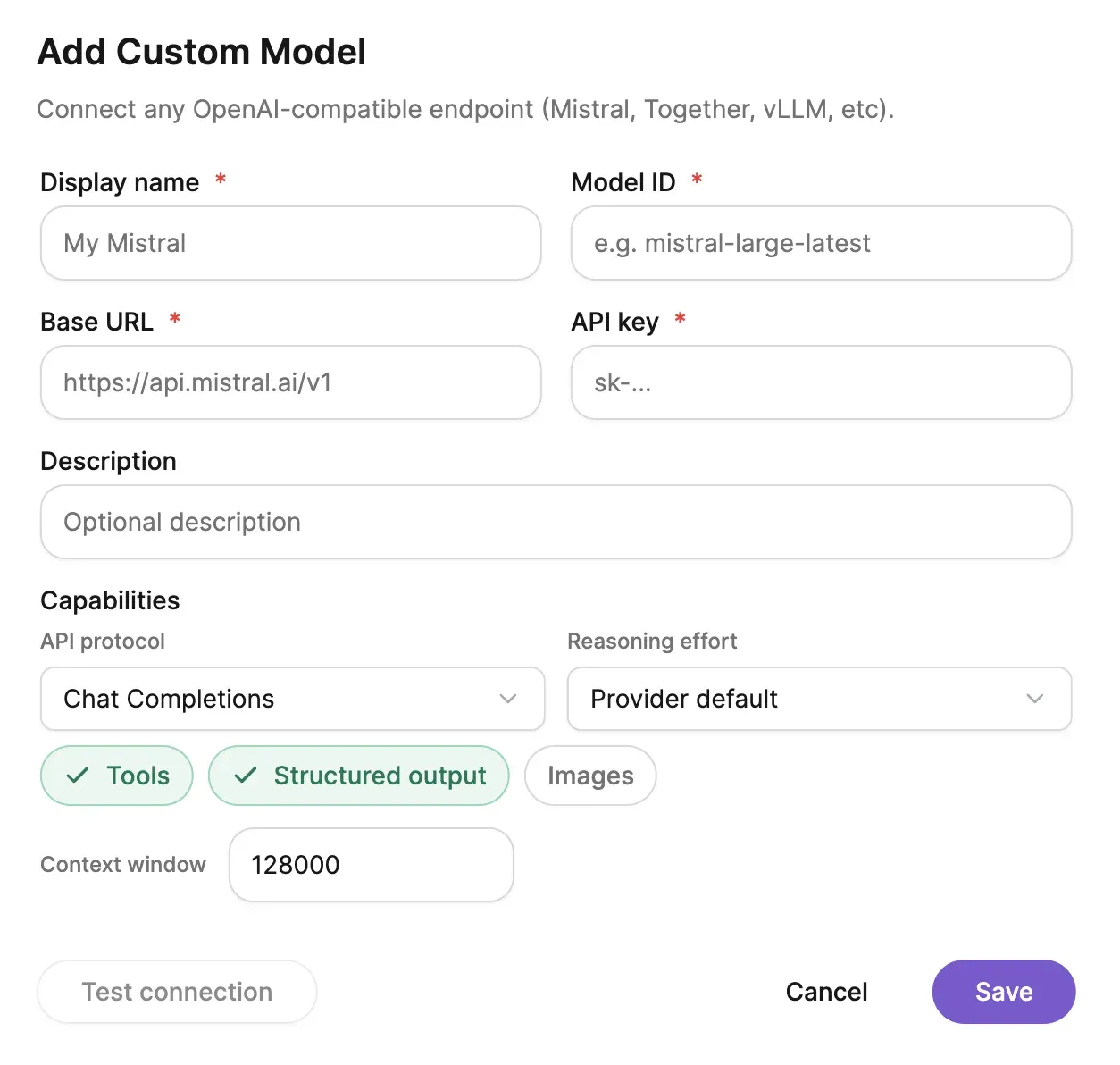
The Model Registry lists every configured model, local engines and cloud providers side by side, and hot-swaps the model an agent uses from the UI with no restart. It arrived with bring your own model in v0.17.1: an end user registers a model with their own key and base URL, and the connection is SSRF-protected so it cannot be pointed at an internal address.
Fallback runs in two layers. A model can carry an ordered list of backup models, tried in turn when a call fails; if none succeeds, or none is set, the instance-level fallback takes over: FALLBACK_LLM_PROVIDER, FALLBACK_LLM_NAME and its own key. Answers served by a fallback are tagged as such in token and cost attribution.
In workflows each node can override the model, and context compression can run on a separate, cheaper model.
hot swap · byom (ssrf-protected) · backup_models · fallback_llm_* · per-node override
Embeddings and vector stores
Local embeddings on ONNX Runtime; seven stores, and pgvector unlocks hybrid search and GraphRAG.
Embeddings run locally through FastEmbed on ONNX Runtime. A new installation is pinned to ibm-granite/granite-embedding-311m-multilingual-r2: multilingual, with a 32k-token context and 768 dimensions. An installation that already has an index stays on the model that index was built with, all-mpnet-base-v2, until you re-embed; DocsGPT prints the migration steps. sentence-transformers is still supported, as are OpenAI or Azure embeddings and a remote /v1/embeddings endpoint.
Changing the embedding model means rebuilding the index. Queries and stored vectors have to come from the same model, and because granite-311m and all-mpnet-base-v2 are both 768-dimensional nothing fails loudly. Retrieval just gets worse. Set EMBEDDINGS_NAME, then run the re-embed script; DocsGPT reports any source whose vectors came from a different model.
FAISS is the default vector store and needs no server. pgvector turns your PostgreSQL into the store and is required for hybrid BM25 + vector search and GraphRAG (v0.18). Qdrant, Milvus, Elasticsearch, LanceDB and MongoDB Atlas are supported as vector-only stores.
fastembed · onnx runtime · ibm-granite/granite-embedding-311m-multilingual-r2 · reembed after a swap
| Role | Hybrid BM25 + vector | GraphRAG | |
|---|---|---|---|
| FAISS | Default; file-based, no server | No | No |
| pgvector | PostgreSQL extension; required for hybrid search and GraphRAG | Yes | Yes |
| Qdrant | Alternative vector store | No | No |
| Milvus | Alternative vector store | No | No |
| Elasticsearch | Alternative vector store | No | No |
| LanceDB | Alternative vector store | No | No |
| MongoDB | Alternative vector store; Atlas or self-hosted, via any connection string | No | No |
Hybrid search and GraphRAG need pgvector (v0.18). Every other store is vector-only: the base store returns no keyword matches, so hybrid retrieval degrades to vector search.
How it runs privately
Model choice decides the posture.
| Cloud | Managed | On-premises | Air-gapped | |
|---|---|---|---|---|
| Who operates | Arc53, multi-tenant | Arc53, dedicated instance | Customer, with Arc53 support | Customer, with Arc53 support |
| LLM | Cloud provider via Arc53 | Cloud provider, local engine or your own key | Local engine, or your cloud LLM (hybrid) | Local engine only |
| External network | Yes | Yes | Optional | None |
Hybrid, meaning an on-premises platform calling a cloud LLM, is on-premises, not air-gapped. Air-gapped means zero external network.
The platform is the same in every posture; what changes is the model layer. Air-gapped means a local engine, local embeddings and a self-hosted vector store with no external network. On-premises may add a cloud LLM (hybrid). Cloud and Managed use a provider by default, or your own key.
Compare all four on deployment options; model choice does not change the price. Test a candidate model on your own cases before switching with benchmarks and evals.
Frequently asked questions
Can I run the LLM locally?
- Yes. Point DocsGPT at Ollama, llama.cpp, vLLM, TGI, SGLang, LMDeploy, Aphrodite, FriendliAI or any OpenAI-compatible engine running on your own hardware, and pair it with local embeddings and a self-hosted vector store for a fully local stack.
Which local LLM engines work with RAG in DocsGPT?
- Ollama, llama.cpp, vLLM, Text Generation Inference (TGI), SGLang, LMDeploy, Aphrodite and FriendliAI are documented with their default ports; llama.cpp also has a native provider that needs no server, and anything else exposing an OpenAI-compatible endpoint works through the generic provider.
Can I switch models without downtime?
- Yes. The Model Registry hot-swaps the model an agent uses from the UI without a restart (shipped in v0.17.1), and if a call fails DocsGPT tries the model’s backup models in order, then the instance-level fallback LLM.
Can users bring their own model key?
- Yes. With bring-your-own-model (v0.17.1) an end user registers a model with their own API key and base URL; the connection is SSRF-protected so a user cannot point the platform at internal addresses.
Which vector databases are supported?
- FAISS (default), pgvector, Qdrant, Milvus, Elasticsearch, LanceDB and MongoDB, either Atlas or self-hosted. Hybrid BM25 + vector search and GraphRAG require pgvector; the others are vector-only.
Do I have to re-index when I change the embedding model?
- Yes. Stored vectors and queries must come from the same embedding model, so an existing index has to be rebuilt after a change. The catch is that it does not fail loudly. The current default and the legacy model are both 768-dimensional, so a swap without a re-embed silently returns worse answers. Set the new model, run the re-embed script, and DocsGPT will name any source still holding vectors from another model.
See DocsGPT on your documents
A 30-minute demo on your model of choice, or self-host with Ollama in five minutes.